OO-ALV
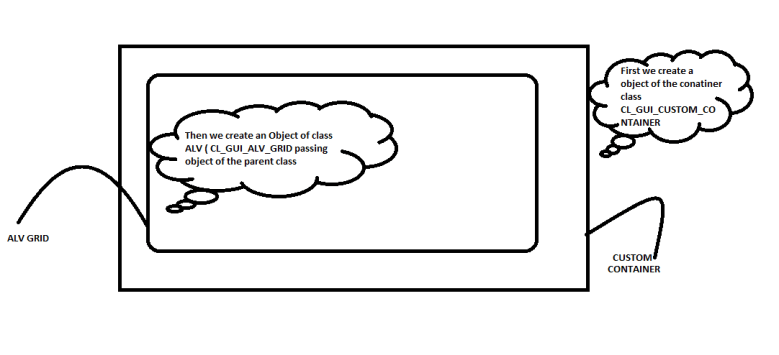
Steps need to follow to create OOALV
- Create Screen
- Insert Custom Container UI element.
- Create Module.
- Create instance for Custom Container and add instance to ALV.
- Get data from tables
- Set data to ALV
*&———————————————————————*
*& Report  ZOOALV_TEST_1
*&
*&———————————————————————*
*&
*&
*&———————————————————————*
REPORT zooalv_test_1.

TYPES : BEGIN OF ty_mara,
matnr TYPE matnr,
mtart TYPE mtart,
mbrsh TYPE mbrsh,
END OF ty_mara.

DATA : lv_container TYPE REF TO cl_gui_custom_container,
lv_alv      TYPE REF TO cl_gui_alv_grid,
it_mara     TYPE TABLE OF ty_mara,
it_fcat     TYPE lvc_t_fcat,
wa_fcat     TYPE lvc_s_fcat.

START-OF-SELECTION.
CALL  SCREEN 100.
*&———————————————————————*
*&      Module  STATUS_0100  OUTPUT
*&———————————————————————*
*       text
*———————————————————————-*
MODULE status_0100 OUTPUT.
SET PF-STATUS ‘ZTEST1’.
SET TITLEBAR ‘ZTEST2’.
CASE sy–ucomm.
WHEN ‘BACK’ OR ‘CANC’.
LEAVE TO SCREEN 0.
WHEN ‘SAVE’.
MESSAGE ‘OPERATION NOT POSSIBLE NOW’ TYPE ‘I’.
WHEN OTHERS.
ENDCASE.
CREATE OBJECT lv_container
EXPORTING
*    parent                      =
container_name              = ‘CC_ALV’
*    style                       =
*    lifetime                    = lifetime_default
*    repid                       =
*    dynnr                       =
*    no_autodef_progid_dynnr     =
*  EXCEPTIONS
*    cntl_error                  = 1
*    cntl_system_error           = 2
*    create_error                = 3
*    lifetime_error              = 4
*    lifetime_dynpro_dynpro_link = 5
*    others                      = 6
.
IF sy–subrc <> 0.
* MESSAGE ID SY-MSGID TYPE SY-MSGTY NUMBER SY-MSGNO
*            WITH SY-MSGV1 SY-MSGV2 SY-MSGV3 SY-MSGV4.
ENDIF.

CREATE OBJECT lv_alv
EXPORTING
*    i_shellstyle      = 0
*    i_lifetime        =
i_parent          = lv_container
*    i_appl_events     = space
*    i_parentdbg       =
*    i_applogparent    =
*    i_graphicsparent  =
*    i_name            =
*    i_fcat_complete   = SPACE
*  EXCEPTIONS
*    error_cntl_create = 1
*    error_cntl_init   = 2
*    error_cntl_link   = 3
*    error_dp_create   = 4
*    others            = 5
.
IF sy–subrc <> 0.
* MESSAGE ID SY-MSGID TYPE SY-MSGTY NUMBER SY-MSGNO
*            WITH SY-MSGV1 SY-MSGV2 SY-MSGV3 SY-MSGV4.
ENDIF.

*SELECT * FROM mara into TABLE it_mara
*  UP TO 50 rows.

*  Build Field catalog
wa_fcat–col_pos = ‘1’.
wa_fcat–fieldname = ‘MATNR’.
wa_fcat–tabname = ‘MARA’.
wa_fcat–scrtext_m = ‘Material No’.
APPEND wa_fcat to it_fcat.
CLEAR : wa_fcat.
wa_fcat–col_pos = ‘2’.
wa_fcat–fieldname = ‘MTART’.
wa_fcat–tabname = ‘MARA’.
wa_fcat–scrtext_m = ‘Material Type’.
APPEND wa_fcat to it_fcat.
CLEAR : wa_fcat.
wa_fcat–col_pos = ‘3’.
wa_fcat–fieldname = ‘MBRsh’.
wa_fcat–tabname = ‘MARA’.
wa_fcat–scrtext_m = ‘Induxtry sector’.
APPEND wa_fcat to it_fcat.
CLEAR : wa_fcat.

SELECT matnr
mtart
mbrsh
FROM mara
into  TABLE it_mara
UP TO 50 ROWS.

CALL METHOD lv_alv->set_table_for_first_display
EXPORTING
*    i_buffer_active               =
*    i_bypassing_buffer            =
*    i_consistency_check           =
i_structure_name               = ‘ty_MARA’
*    is_variant                    =
*    i_save                        =
*    i_default                     = ‘X’
*    is_layout                     =
*    is_print                      =
*    it_special_groups             =
*    it_toolbar_excluding          =
*    it_hyperlink                  =
*    it_alv_graphics               =
*    it_except_qinfo               =
*    ir_salv_adapter               =
CHANGING
it_outtab                     = it_mara
it_fieldcatalog               = it_fcat
*    it_sort                       =
*    it_filter                     =
*  EXCEPTIONS
*    invalid_parameter_combination = 1
*    program_error                 = 2
*    too_many_lines                = 3
*    others                        = 4
.
IF sy–subrc <> 0.
* Implement suitable error handling here
ENDIF.

ENDMODULE.                 ” STATUS_0100  OUTPUT
OO ALV FACTORY METHOD
CL_SALV_TABLE is the class used for this purpose
When ever we use ALV factory methods to display ALV, we don`t need to create any field catalog, we can directly add our user defined tables instance as it automatically determine fields and displays.
Below demonstrate a nice example
REPORT ZSAPN_ALV_MARA_FACTORY.
TYPES: BEGIN OF TY_MARA,
MATNR TYPE MARA–MATNR,
MTART TYPE MARA–MTART,
MBRSH TYPE MARA–MBRSH,
MATKL TYPE MARA–MATKL,
MEINS TYPE MARA–MEINS,
END OF TY_MARA.
DATA : IT_MARA TYPE TABLE OF TY_MARA,
WA_MARA TYPE MARA.
DATA : LR_ALV TYPE REF TO CL_SALV_TABLE.
SELECT MATNR MTART MBRSH MATKL MEINS FROM MARA INTO TABLE IT_MARA UP TO 50 ROWS.
*  TRY.
CALL METHOD CL_SALV_TABLE=>FACTORY “get SALV factory instance
*    EXPORTING
*      LIST_DISPLAY   = IF_SALV_C_BOOL_SAP=>FALSE
*      R_CONTAINER    =
*      CONTAINER_NAME =
IMPORTING
R_SALV_TABLE = LR_ALV
CHANGING
T_TABLE      = IT_MARA.
*   CATCH CX_SALV_MSG .
*  ENDTRY.

**get ALV columns
DATA : LR_COLUMNS TYPE REF TO CL_SALV_COLUMNS_TABLE. “columns instance
DATA : LR_COL TYPE REF TO CL_SALV_COLUMN_TABLE. “column instance
CALL METHOD LR_ALV->GET_COLUMNS  “get all columns
RECEIVING
VALUE = LR_COLUMNS.
IF LR_COLUMNS IS NOT INITIAL.
*TRY.
*   Get VBELN column
TRY.
LR_COL ?= LR_COLUMNS->GET_COLUMN( ‘MATNR’ ). “get MATNR columns to insert hotspot
CATCH CX_SALV_NOT_FOUND.
ENDTRY.
*
*   Set the Hotspot for MATNR Column
TRY.
CALL METHOD LR_COL->SET_CELL_TYPE “set cell type hotspot
EXPORTING
VALUE = IF_SALV_C_CELL_TYPE=>HOTSPOT.
.
CATCH CX_SALV_DATA_ERROR .
ENDTRY.
ENDIF.
LR_ALV->DISPLAY( ).
How to create GUI status and Title bar in ALV reports
For example, we have the below code for ALV and the object is activated, first you need to make sure that the GUI status and titlebar are in capital letters and follow the steps
- double click on the line which says set pf status

2. A dialog box will appear give a short text

3. Then save and activate
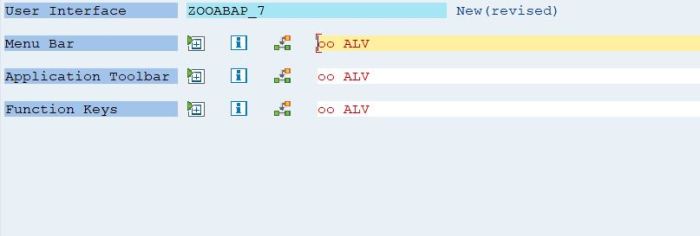
Similarly follow the same steps for set titlebar as shown below
What does ‘?=’ means in CL_SALV_TABLE class
This ‘?=’ denotes a widening cast operator. In widening cast we assign reference of superclass to reference of subclass.
Suppose u have a superclass lcl_vehicle
its reference is r_vehicle.
abd you have its subclass lcl_car
with reference r_car.
r_car ?= r_vehicle.
‘?=’ denotes the WIDECASTING Operator in ABAP Object.
The assignment of an object reference to an interface reference is known as a narrowing cast since, as with inheritance, only a part of the object interface is visible once you have assigned the reference.
With an interface reference, you can no longer address all components in the class carrying out the implementation, but only the components defined in the interface. These components are now addressed using the interface reference exclusively with their own u2018shortu2019 name!
When an object reference is assigned to an interface reference, the static types Must be convertible, that is, the class that was used to define the object reference must have implemented the interface-reference interface. Otherwise there will be a syntax error.
The widening cast is, as with inheritance, the opposite of the narrowing cast: here it is used to retrieve an object reference from an interface reference. Obviously it cannot be statically checked, since an interface can be implemented by more than one class.
An object reference cannot be assigned to an interface reference if it has itself not implemented the corresponding interface. It cannot be assigned even if a subclass has implemented the interface and the interface reference points to an object in this class.
Assignments between interface references whose interfaces are not related to each other cannot be checked statically and must therefore be formulated using the cast operator u201C?=u201D.
For this type of assignment, a check must be carried out at runtime to see whether the class of the instance that the source reference points to also supports the interface that the target reference refers to. If this is the case, the cast is carried out, otherwise the catchable runtime MOVE_CAST_ERROR occurs.
This type of cast is neither a widening nor a narrowing cast, rather a switch from one view of an object to another.
 Binarybuggs