Some Important points
Several options for searching for classic BAdis:
- Free search via transaction SE84 – List of freely selected BAdis
- Application-related search via transaction SE81 – Listing of application-related badis
- Program-related search: Search for “GET_INSTANCE” in the program, the function module or in the method. Double-click the reference variable to navigate to the variable definition. You can also set a breakpoint in the method GET_INSTANCE and call the program. Then double-click on the BAdI interface to navigate to the interface. Start to CL_EX_ the where-used list in classes.
How are you looking for new BAdis?
The search for a suitable BAdi (Enhancement Spot) is analogous to the search for classic BAdis. However, in the program-related search, we are not looking for GET_INSTANCE but for GET_BADI.
BADI Example with screenshots
- Create an enhancement spot


2. Once the enhancement spot is created , create the BADI by clicking on the create button

3. Once the BADI is create save and then provide an interface name in the Interface field and double click system will prompt you to create a new interface, click on Yes

4. Give a method name and provide the parameters


5. Once the interface is created go back to the enhancement spot and click on implementations and create a enhancement implementation by provide a suitable name and short description
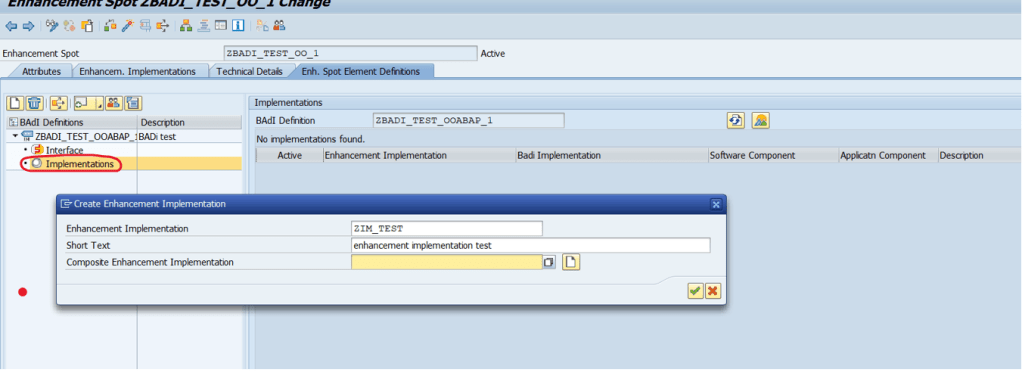
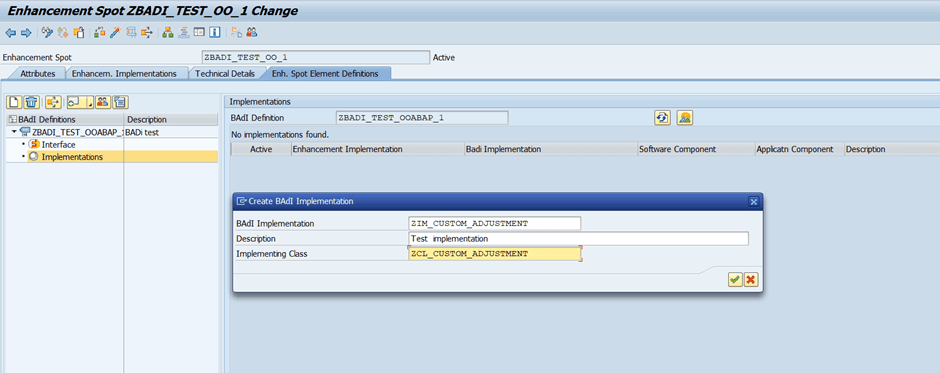
6. Once the enhancement implementation is created system will prompt you to create a BADI implementation
provide a suitable name for badi implementation and also provide the implementing class
7. The enhancement implementation will look something like this

8. Double click on impleting class to create the class which we provided in step 6

9. You will see automatically it has the interface method which we created previously

10. Implement the method from the interface in this class activate and go back

11. Activate the enhancement implementation
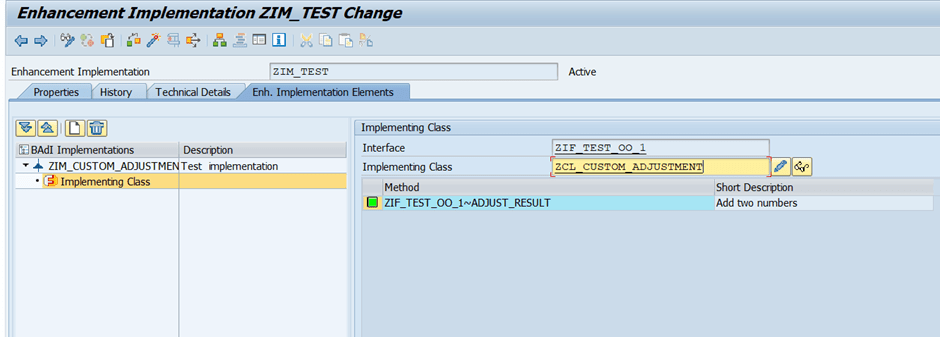
12. Activate the enhancement spot

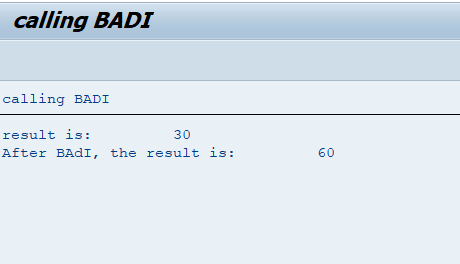
13. BADI is now complete, and it looks something like this

14. Once the BADI is created create a sample program
&———————————————————————
*& Report zooabap_8
*&———————————————————————*
*&
*&———————————————————————*
REPORT zooabap_8.PARAMETERS: inp1 TYPE i DEFAULT 10,
inp2 TYPE i DEFAULT 20.START-OF-SELECTION.
” before calling BAdI
DATA: lv_result TYPE i.
lv_result = inp1 + inp2.
WRITE: ‘result is:’ , lv_result.“call BADI
DATA: lo_adj_badi TYPE REF TO zbadi_test_ooabap_1. ” BAdI name
GET BADI lo_adj_badi.
IF lo_adj_badi IS BOUND.
CALL BADI lo_adj_badi->adjust_result
EXPORTING
input1 = inp1
input2 = inp2
CHANGING
result = lv_result.WRITE: / ‘After BAdI, the result is:’ , lv_result.
ELSE.
WRITE: / ‘BAdI is not implemented!’.
ENDIF.

15. Classic way of BADI implementation
&———————————————————————
*& Report zooabap_8
*&———————————————————————*
*&
*&———————————————————————*
REPORT zooabap_8.PARAMETERS: inp1 TYPE i DEFAULT 10,
inp2 TYPE i DEFAULT 20.START-OF-SELECTION.
” before calling BAdI
DATA: lv_result TYPE i.
lv_result = inp1 + inp2.
WRITE: ‘result is:’ , lv_result.“call BADI
DATA: lo_custom_adj TYPE REF TO ZIF_TEST_OO_1.
DATA: lv_imp_exist TYPE c.
CALL METHOD cl_exithandler=>get_instance
EXPORTING
exit_name = ‘ZBADI_TEST_OOABAP_1’ ” BAdI name
null_instance_accepted = ”
IMPORTING
act_imp_existing = lv_imp_exist
CHANGING
instance = lo_custom_adj ” type ref to BAdI’s interface
EXCEPTIONS
OTHERS = 1.
IF sy-subrc <> 0.
ENDIF.
IF lv_imp_exist IS NOT INITIAL.
lo_custom_adj->adjust_result( ).
ENDIF.
 Binarybuggs